
Digital Future

Automation & AI

From classic process automation to autonomous AI agents – we implement scalable solutions that make your business more efficient.

Fundamentals

What is Workflow Automation?

Workflow automation means the digitalisation and automation of recurring business processes. Instead of performing manual tasks repeatedly by hand, intelligent systems take over this work – reliably, error-free and around the clock.

With modern low-code platforms like n8n and Make.com, workflows can be designed visually – without deep programming knowledge. This makes automation accessible for companies of any size.
AI Workflow Automation
Three Evolution Levels

How AI is Changing Automation

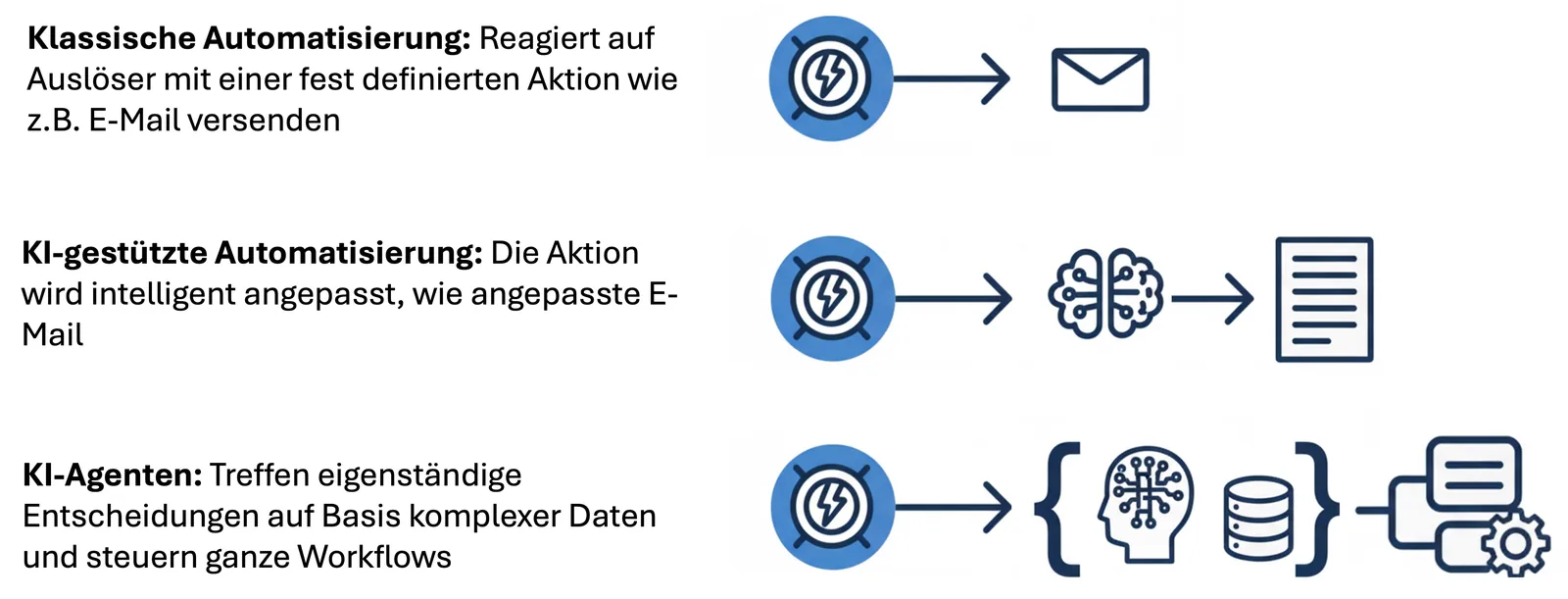
Automation evolves – from simple rules to autonomous decisions.

01
Classic Automation

Predefined responses to specific triggers. Suitable for rule-based, repetitive processes with clear if-then logic.

02
AI-Enhanced Automation

Intelligent adaptation of actions based on context – e.g. personalised content creation or dynamic decisions.

03
AI Agents

Autonomous decision-making based on complex data. Agents plan, prioritise and act independently within defined parameters.

Benefits at a Glance

What Automation Delivers

Increase Efficiency

Eliminate routine tasks – gain strategic focus.

Reduce Costs

Conserve resources through automated, scalable processes.

Minimise Errors

Consistent quality through rule-based execution.

Scalability

Enable growth without proportional headcount increases.

Relieve Employees

More motivation through demanding, value-adding work.

24/7 Availability

Processes run without interruption – even outside business hours.

Case Study

Case Study: A Newsletter That Largely Produces Itself

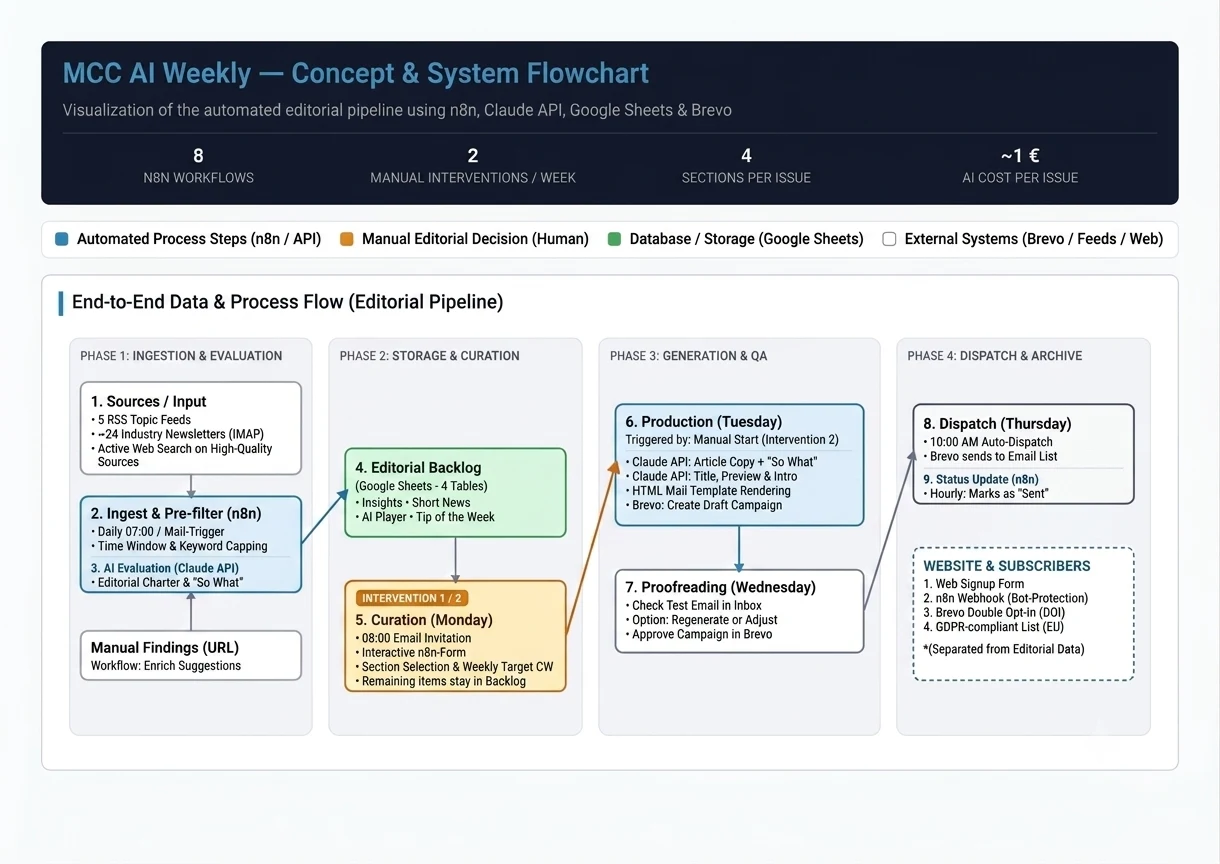
Our own newsletter MCC AI Weekly – published Thursdays, in English, for executives – is also our showcase: the project follows the approach of a semi-automated editorial pipeline (“editorial as a pipeline”). Routine tasks – collecting, pre-filtering, scoring, HTML generation and status updates – run fully automatically. The two critical quality and editorial decisions are deliberately reserved for human hands.
8
Workflows in n8n
2
Manual interventions per week
~€1
AI cost per issue
100+ → ~12
Finds per day to items per issue
−90 %
less routine work
Flowchart of the semi-automated newsletter editorial pipeline with eight n8n workflows
The editorial pipeline: eight n8n workflows from sign-up to dispatch.

The 8 n8n Workflows & System Components

  1. Sign-up (Webhook): Receives the website form, checks for bots, hands off to Brevo for double opt-in (DOI).
  2. Content ingest (Cron/IMAP): Reads feeds & mailbox, filters, scores with the Claude API and writes to Google Sheets.
  3. Enrich suggestions (Cron): Enriches manually added links with metadata.
  4. Web search discovery (Cron, Monday): Actively searches selected company sites for high-quality new sources and adds them to the editorial backlog.
  5. Monday invitation (Cron): Sends the curation link to the editorial team.
  6. Curation form (Form Trigger): Provides the selection UI and saves the chosen items back.
  7. Production (Manual Trigger): AI text generation, template rendering, Brevo draft creation.
  8. Log dispatch (Cron): Updates the article status in the Google Sheets backlog.

Technical Highlights & Safeguards

  • Self-hosting (n8n): Full control over credentials, backlog and logic.
  • Data protection (GDPR): Separation of editorial data (Google Sheets / Claude) and subscriber data (Brevo, servers in the EU/Berlin).
  • Resilience: Protection against broken links (the Monday invitation checks its own link); no automatic publishing without explicit approval – the campaign is always created as an unscheduled draft.

For how the weekly rhythm, the eight workflows from source to issue and the GDPR-compliant dispatch fit together in detail, see our in-depth concept behind MCC AI Weekly.

Case Study

Case Study: AI-Powered Chatbot

An example of AI-powered automation: an intelligent chatbot that understands documents, responds contextually and logs conversations – fully automated.
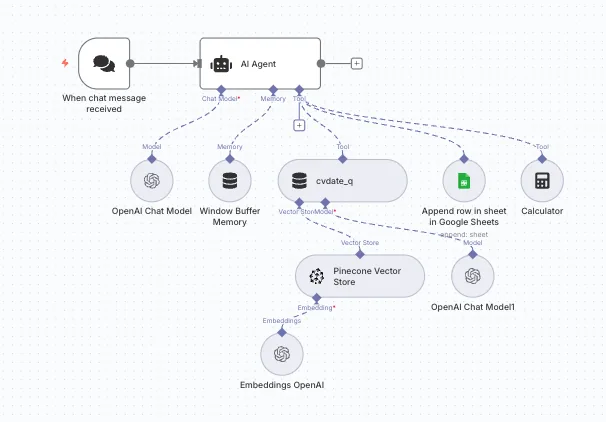
  • Document Vectorisation: Content is made semantically processable
  • AI Decision Nodes: Intelligent routing and response generation
  • Conversation Memory: Contextual conversation history management
  • Semantic Document Search: Precise information extraction
  • Automated Logging: Conversation data directly into spreadsheets
ChatBot Case Study